Getting Started with LangChain and LangGraph in TypeScript
If you're building AI-powered features in a Node.js or Next.js project, LangChain.js and LangGraph are the two libraries you need to know. LangChain gives you the building blocks — model calls, prompt templates, tools, and memory. LangGraph takes it further by letting you orchestrate multi-step AI workflows as stateful graphs.
I've used both in production to build everything from portfolio chatbots to automated content pipelines. This post covers what I've learned — with TypeScript examples you can drop into your own projects.
What is LangChain.js?
LangChain.js is the JavaScript/TypeScript port of the LangChain framework. It provides a composable set of abstractions for working with LLMs:
- Models — Unified interface across OpenAI, Anthropic, Google, and open-source models
- Prompt Templates — Reusable, parameterized prompts with type safety
- Output Parsers — Structured extraction from LLM responses (JSON, lists, custom schemas)
- Tools — Let the LLM call functions, APIs, or databases
- Memory — Persist conversation history across interactions
- Chains — Compose multiple steps into a single callable pipeline
What is LangGraph?
LangGraph is a library built on top of LangChain for creating stateful, multi-actor AI workflows as directed graphs. While chains are linear (step A then step B), LangGraph lets you build workflows with:
- Conditional branching — Route to different nodes based on LLM decisions
- Cycles and loops — Let agents retry, reflect, or iterate
- Shared state — Pass a typed state object through every node
- Human-in-the-loop — Pause execution for user approval before continuing
Think of it this way: LangChain is for building individual AI capabilities. LangGraph is for wiring those capabilities into an intelligent workflow.
Installation
npm install langchain @langchain/openai @langchain/core @langchain/langgraph
Set your API key in .env:
OPENAI_API_KEY=sk-your-key-here
LangChain Basics: Your First Chain
A chain connects a prompt template to a model. Here's the simplest possible example:
import { ChatOpenAI } from "@langchain/openai";
import { ChatPromptTemplate } from "@langchain/core/prompts";
import { StringOutputParser } from "@langchain/core/output_parsers";

const model = new ChatOpenAI({
  modelName: "gpt-4o",
  temperature: 0.7,
});

const prompt = ChatPromptTemplate.fromTemplate(
  "Explain {topic} in 2-3 sentences for a developer audience."
);

const chain = prompt.pipe(model).pipe(new StringOutputParser());

const result = await chain.invoke({ topic: "WebSockets" });
console.log(result);
// "WebSockets provide a persistent, full-duplex connection between
//  client and server, enabling real-time data exchange..."
The .pipe() syntax is LangChain's composable API — each step feeds its output into the next. The StringOutputParser extracts the raw text from the model's response object.
Structured Output with Zod
One of LangChain.js's best features is structured output parsing using Zod schemas. Instead of hoping the LLM returns valid JSON, you can enforce a schema:
import { ChatOpenAI } from "@langchain/openai";
import { ChatPromptTemplate } from "@langchain/core/prompts";
import { z } from "zod";

const model = new ChatOpenAI({ modelName: "gpt-4o", temperature: 0 });

const techReviewSchema = z.object({
  name: z.string().describe("Technology name"),
  category: z.enum(["frontend", "backend", "database", "devops"]),
  pros: z.array(z.string()).describe("Key advantages"),
  cons: z.array(z.string()).describe("Key disadvantages"),
  verdict: z.string().describe("One-sentence recommendation"),
});

const structuredModel = model.withStructuredOutput(techReviewSchema);

const prompt = ChatPromptTemplate.fromTemplate(
  "Give a brief technical review of {technology}."
);

const chain = prompt.pipe(structuredModel);

const review = await chain.invoke({ technology: "Next.js App Router" });
console.log(review.category); // "frontend"
console.log(review.pros);     // ["Server components", "Streaming", ...]
The response is fully typed — your IDE gives you autocomplete on review.category, review.pros, etc.
Adding Tools: Let the LLM Take Actions
Tools allow the model to call functions when it needs external data or wants to perform actions. Here's an example with a custom tool:
import { ChatOpenAI } from "@langchain/openai";
import { tool } from "@langchain/core/tools";
import { createReactAgent } from "@langchain/langgraph/prebuilt";
import { z } from "zod";

// Define a tool the LLM can use
const weatherTool = tool(
  async ({ city }: { city: string }) => {
    // In production, call a real weather API here
    const data: Record<string, string> = {
      "London": "15°C, cloudy",
      "Tokyo": "28°C, sunny",
      "New York": "22°C, partly cloudy",
    };
    return data[city] ?? `Weather data not available for ${city}`;
  },
  {
    name: "get_weather",
    description: "Get the current weather for a city",
    schema: z.object({
      city: z.string().describe("The city name"),
    }),
  }
);

const model = new ChatOpenAI({ modelName: "gpt-4o" });

// Create an agent that can use the tool
const agent = createReactAgent({
  llm: model,
  tools: [weatherTool],
});

const response = await agent.invoke({
  messages: [{ role: "user", content: "What's the weather in Tokyo?" }],
});
The agent decides when to call the tool. If the user asks "What's 2 + 2?" it answers directly. If they ask about weather, it invokes get_weather.
Conversation Memory
For chatbot-style applications, you need the model to remember previous messages. LangChain provides several memory strategies:
import { ChatOpenAI } from "@langchain/openai";
import { ChatPromptTemplate, MessagesPlaceholder } from "@langchain/core/prompts";
import { InMemoryChatMessageHistory } from "@langchain/core/chat_history";
import { RunnableWithMessageHistory } from "@langchain/core/runnables";

const model = new ChatOpenAI({ modelName: "gpt-4o" });

const prompt = ChatPromptTemplate.fromMessages([
  ["system", "You are a helpful coding assistant. Be concise."],
  new MessagesPlaceholder("history"),
  ["human", "{input}"],
]);

const chain = prompt.pipe(model);

// Store conversation history per session
const messageHistories: Record<string, InMemoryChatMessageHistory> = {};

const withHistory = new RunnableWithMessageHistory({
  runnable: chain,
  getMessageHistory: async (sessionId: string) => {
    if (!messageHistories[sessionId]) {
      messageHistories[sessionId] = new InMemoryChatMessageHistory();
    }
    return messageHistories[sessionId];
  },
  inputMessagesKey: "input",
  historyMessagesKey: "history",
});

// First message
await withHistory.invoke(
  { input: "My name is Chirag. I work with Next.js." },
  { configurable: { sessionId: "user-123" } }
);

// Follow-up — the model remembers context
const response = await withHistory.invoke(
  { input: "What framework did I mention?" },
  { configurable: { sessionId: "user-123" } }
);
// "You mentioned Next.js."
LangGraph: Building a Multi-Step AI Workflow
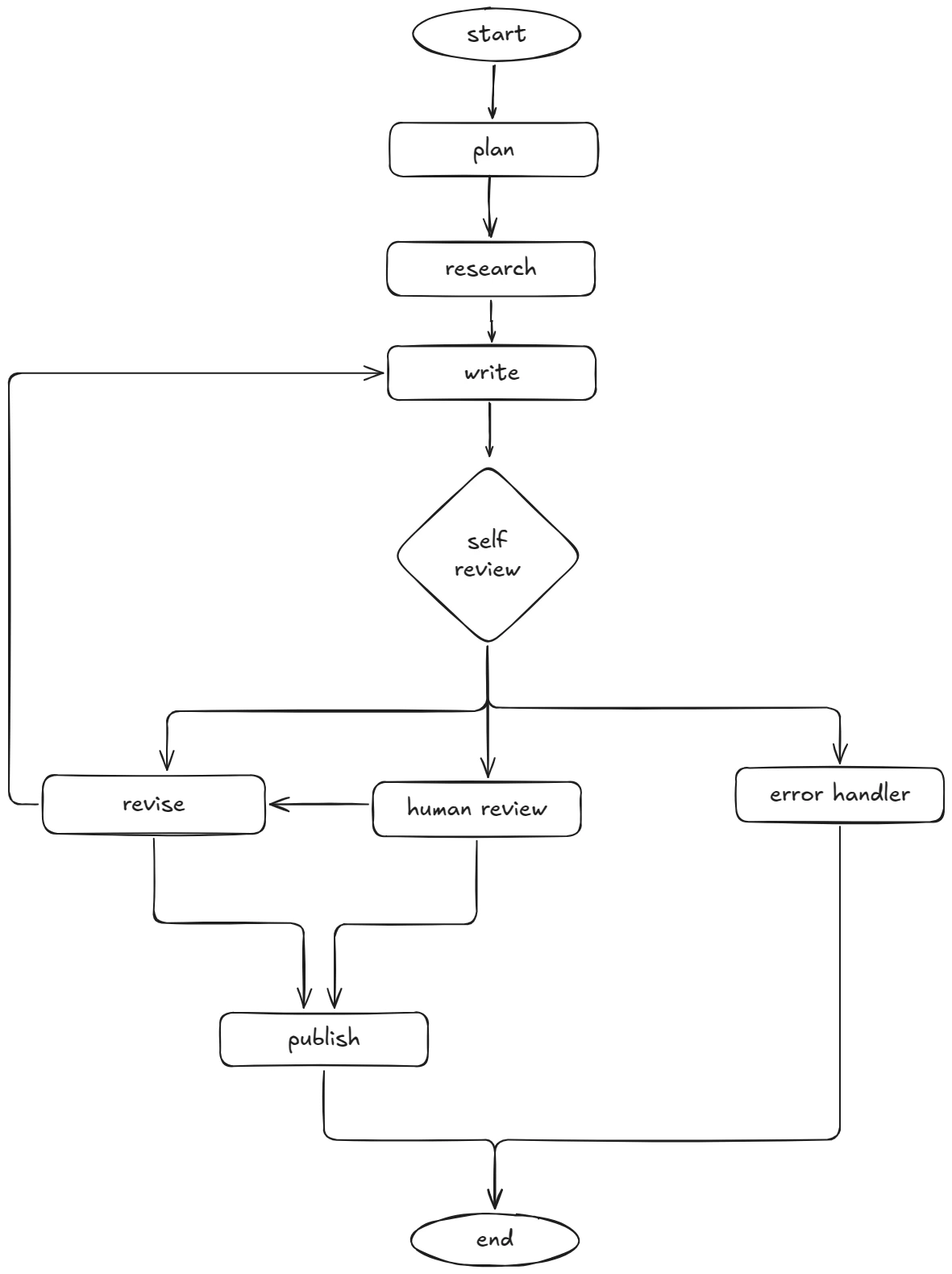
This is where it gets interesting. Let's build a blog post generator that plans an outline, writes the content, and then reviews it — with the ability to loop back and revise.
Defining the State
Every LangGraph workflow starts with a typed state:
import { Annotation, StateGraph, END } from "@langchain/langgraph";

const BlogState = Annotation.Root({
  topic: Annotation<string>,
  outline: Annotation<string>,
  research: Annotation<string>,
  draft: Annotation<string>,
  review: Annotation<string>,
  humanDecision: Annotation<string>,
  revisionCount: Annotation<number>,
  error: Annotation<string>,
});
Defining the Nodes
Each node is a function that takes the current state and returns updates:
import { ChatOpenAI } from "@langchain/openai";
import { TavilySearchResults } from "@langchain/community/tools/tavily_search";

const model = new ChatOpenAI({ modelName: "gpt-4o", temperature: 0.7 });
const searchTool = new TavilySearchResults({ maxResults: 3 });

async function planOutline(state: typeof BlogState.State) {
  const response = await model.invoke(
    `Create a structured outline for a technical blog post about: ${state.topic}.
     Include 4-5 sections with brief descriptions.`
  );
  return { outline: response.content as string };
}

async function researchWithTools(state: typeof BlogState.State) {
  const results = await searchTool.invoke(state.topic);
  const response = await model.invoke(
    `Summarize these research findings for a blog post about "${state.topic}":
     ${JSON.stringify(results)}
     Extract key facts, stats, and examples we can reference.`
  );
  return { research: response.content as string };
}

async function writeDraft(state: typeof BlogState.State) {
  const response = await model.invoke(
    `Write a blog post following this outline:\n${state.outline}\n
     Incorporate these research notes:\n${state.research}\n
     Keep it technical, concise, and developer-focused.`
  );
  return { draft: response.content as string };
}

async function reviewDraft(state: typeof BlogState.State) {
  const response = await model.invoke(
    `Review this blog post draft for clarity, accuracy, and engagement.
     Respond with a JSON object: { "quality": "good" | "needs_revision" | "error", "feedback": "..." }

     Draft:\n${state.draft}`
  );
  return { review: response.content as string };
}

async function humanApprovalNode(state: typeof BlogState.State) {
  // This node uses LangGraph's interrupt() to pause execution
  // and wait for human input via the UI before resuming.
  return { humanDecision: "pending" };
}

async function reviseDraft(state: typeof BlogState.State) {
  const response = await model.invoke(
    `Revise this blog draft based on feedback:\n${state.review}\n
     Current draft:\n${state.draft}`
  );
  return {
    draft: response.content as string,
    revisionCount: (state.revisionCount ?? 0) + 1,
  };
}

async function publishBlog(state: typeof BlogState.State) {
  // Publish to CMS, save to database, trigger notifications, etc.
  console.log("Blog published successfully!");
  return {};
}

async function handleFailure(state: typeof BlogState.State) {
  console.error("Workflow failed:", state.error);
  return { error: state.error ?? "Unknown error during blog generation" };
}
Wiring the Graph
Now connect the nodes with conditional edges:
// Conditional edge functions
function qualityGate(state: typeof BlogState.State) {
  const review = JSON.parse(state.review);
  if (review.quality === "good") return "human_review";
  if (review.quality === "needs_revision") return "revise";
  return "error";
}

function humanDecision(state: typeof BlogState.State) {
  return state.humanDecision === "approved" ? "publish" : "revise";
}

function revisionLimit(state: typeof BlogState.State) {
  return (state.revisionCount ?? 0) >= 3 ? "force_publish" : "write";
}

const workflow = new StateGraph<typeof BlogState.State>(BlogState)

  // Nodes
  .addNode("plan", planOutline)
  .addNode("research", researchWithTools)
  .addNode("write", writeDraft)
  .addNode("self_review", reviewDraft)
  .addNode("human_review", humanApprovalNode)   // interrupt → UI → resume
  .addNode("revise", reviseDraft)
  .addNode("publish", publishBlog)
  .addNode("error_handler", handleFailure)

  // Core flow
  .addEdge("__start__", "plan")
  .addEdge("plan", "research")
  .addEdge("research", "write")
  .addEdge("write", "self_review")

  // Quality gate — AI decides if draft is good enough
  .addConditionalEdges("self_review", qualityGate, {
    revise: "revise",
    human_review: "human_review",
    error: "error_handler",
  })

  // Human in the loop — user approves or requests changes
  .addConditionalEdges("human_review", humanDecision, {
    publish: "publish",
    revise: "revise",
  })

  // Revision loop with safety limit
  .addConditionalEdges("revise", revisionLimit, {
    write: "write",
    force_publish: "publish",
  })

  // Terminal nodes
  .addEdge("publish", END)
  .addEdge("error_handler", END);

const app = workflow.compile();

const result = await app.invoke({ topic: "TypeScript Generics" });
console.log(result.draft); // The final published blog post
This graph has several patterns that chains cannot express: a quality gate where the AI self-reviews and decides the next step, a human-in-the-loop interrupt that pauses for user approval, a revision loop that feeds back through writing, and a safety valve that force-publishes after 3 revisions to prevent infinite loops.
Visualizing the Flow
LangGraph vs Plain Chains: When to Use Which
Use LangChain chains when:
- You have a linear pipeline (prompt → model → parse → done)
- The flow is predictable with no branching
- You're building a single-turn interaction
Use LangGraph when:
- The workflow has conditional logic ("if X, do Y, else do Z")
- Agents need to loop, retry, or self-correct
- Multiple agents collaborate on a task
- You need human-in-the-loop approval steps
- State needs to persist and evolve across steps
Production Tips from Real Projects
After shipping several LangChain/LangGraph applications, here's what I've learned:
1. Stream everything. Users hate staring at a loading spinner. Use .stream() instead of .invoke() to show tokens as they arrive:
const stream = await chain.stream({ topic: "GraphQL" });
for await (const chunk of stream) {
  process.stdout.write(chunk);
}
2. Use fallback models. Free-tier models hit rate limits. Chain multiple models so your app stays up:
const primary = new ChatOpenAI({ modelName: "gpt-4o" });
const fallback = new ChatOpenAI({ modelName: "gpt-4o-mini" });

const resilientModel = primary.withFallbacks({
  fallbacks: [fallback],
});
3. Add timeouts. LLM calls can hang. Always set a timeout:
const model = new ChatOpenAI({
  modelName: "gpt-4o",
  timeout: 30000, // 30 seconds
  maxRetries: 2,
});
4. Cache expensive calls. If the same prompt produces the same result, cache it. LangChain supports caching out of the box with in-memory or Redis stores.
5. Log everything. Use LangSmith or your own logging to trace every chain execution. When something goes wrong in production, you'll want to see exactly which step failed and what the inputs were.
What to Build Next
Now that you have the fundamentals, here are some project ideas to sharpen your skills:
- AI code reviewer — A LangGraph workflow that reads a PR diff, analyzes it, and generates review comments
- Multi-agent research assistant — One agent searches the web, another summarizes findings, a third fact-checks
- Automated support bot — Classify tickets, route to the right tool, generate responses, escalate when uncertain
- Content pipeline — Plan, write, review, and publish blog posts with human approval gates
Wrapping Up
LangChain.js gives you the primitives — models, prompts, tools, memory. LangGraph gives you the architecture — graphs, state, branching, loops. Together, they let you build AI features that go far beyond simple chat completions.
Start with a basic chain. Add a tool. Then build your first graph. Each step builds on the last, and before you know it, you're shipping production AI workflows in TypeScript.