Building Type-Safe Full-Stack Apps with tRPC and Next.js
If you've ever shipped a bug because your frontend expected user.firstName but your API returned user.first_name, you know the pain. If you've spent hours debugging why a mutation isn't working only to realize you're passing userId instead of id, you've felt it too. These bugs are preventable — and tRPC eliminates them entirely.
I've used tRPC in production for healthcare platforms, AI-powered SaaS products, and enterprise applications. Once you experience true end-to-end type safety — where changing an API response type instantly shows errors in every component that uses it — you won't want to go back to REST or even GraphQL.
This guide covers everything you need to build production-ready applications with tRPC and Next.js, from initial setup to advanced patterns I've learned shipping real products.
Why tRPC?
The Problem with Traditional APIs
In a typical full-stack application, your API and frontend are separate worlds:
// Backend: You define an endpoint
app.get("/api/users/:id", async (req, res) => {
  const user = await db.user.findUnique({ where: { id: req.params.id } });
  res.json(user);
});

// Frontend: You guess what it returns
const response = await fetch(`/api/users/${id}`);
const user = await response.json();
// user is `any` — no autocomplete, no type checking
console.log(user.firstName); // Hope this field exists!
You can add types manually, but they drift. The backend changes, the frontend types don't get updated, and bugs slip through. You can generate types from OpenAPI specs, but that's another build step, another thing to keep in sync.
The tRPC Solution
tRPC shares types directly between your backend and frontend — no code generation, no API schemas, no drift:
// Backend: Define a procedure with full types
export const userRouter = createTRPCRouter({
  getById: publicProcedure
    .input(z.object({ id: z.string() }))
    .query(async ({ input, ctx }) => {
      return await ctx.db.user.findUnique({ where: { id: input.id } });
    }),
});

// Frontend: Call it with full autocomplete and type checking
const user = await api.user.getById.query({ id: "123" });
// user is fully typed! Autocomplete works, typos are caught at compile time
console.log(user.firstName); // TypeScript knows this field exists
Change the return type on the backend, and TypeScript immediately shows errors everywhere that type is used on the frontend. No manual syncing, no runtime surprises.
tRPC vs REST vs GraphQL
| Feature | REST | GraphQL | tRPC |
|---|---|---|---|
| Type safety | Manual | Schema + codegen | Automatic |
| Setup complexity | Low | High | Low |
| Learning curve | Low | High | Low |
| Bundle size | N/A | Large (client) | Tiny |
| Best for | Public APIs | Complex data needs | Full-stack TypeScript |
tRPC is purpose-built for teams that own both the frontend and backend. If you're building a public API for third parties, stick with REST or GraphQL. If you're building a product where you control both ends, tRPC is the fastest path to type-safe, bug-free code.
Setting Up tRPC with Next.js App Router
Let's build a real setup from scratch. I'll show you the pattern I use in production applications.
Installation
bun add @trpc/server @trpc/client @trpc/react-query @tanstack/react-query zod superjson
Here's what each package does:
| Package | Purpose |
|---|---|
@trpc/server | Create routers and procedures on the backend |
@trpc/client | Vanilla client for calling procedures |
@trpc/react-query | React hooks with TanStack Query integration |
@tanstack/react-query | Caching, refetching, optimistic updates |
zod | Runtime input validation with TypeScript inference |
superjson | Serialize dates, Maps, Sets, etc. across the wire |
Note: The
@trpc/nextpackage is primarily for Pages Router. With App Router, you use the fetch adapter directly.
Project Structure
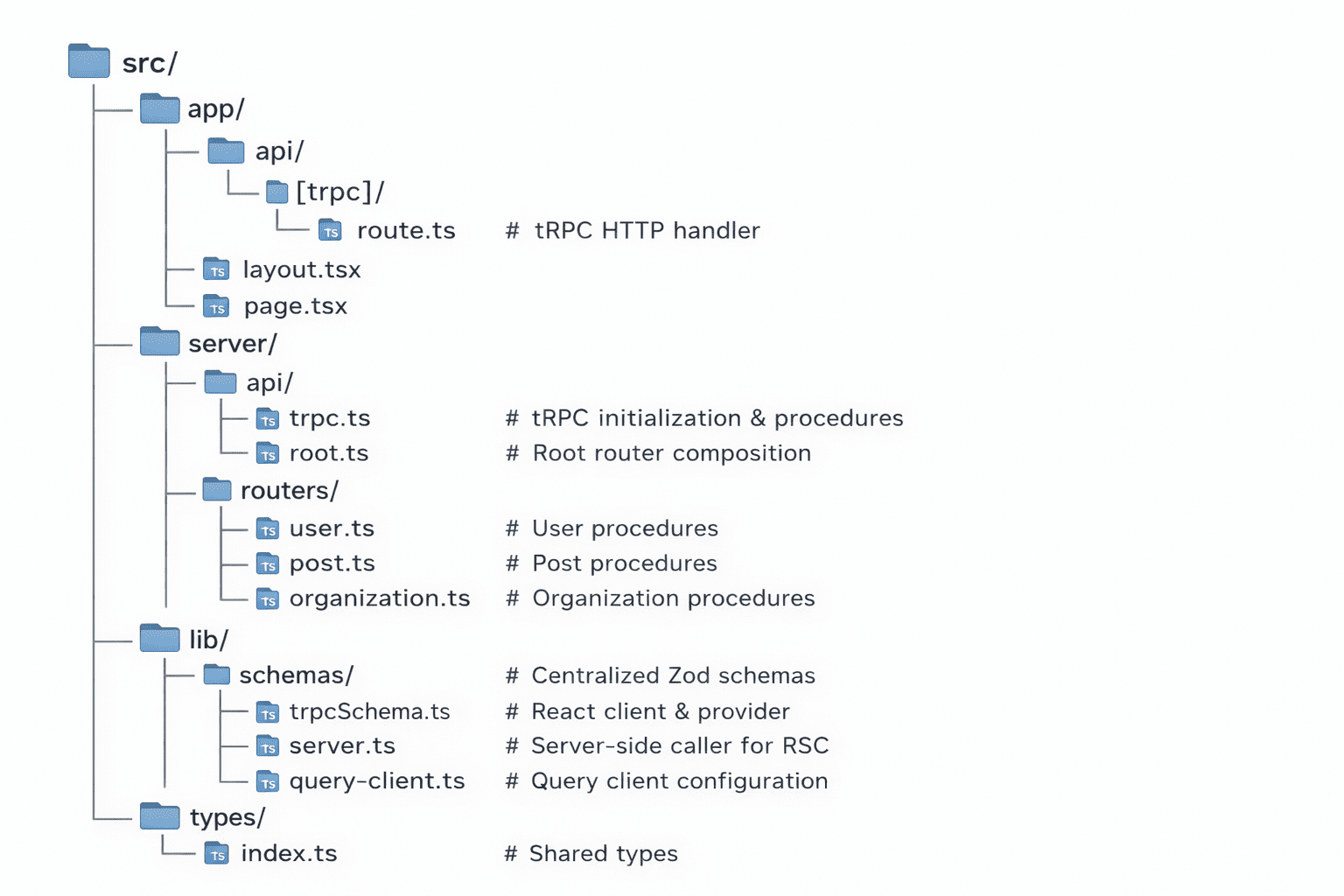
Here's the structure I use for tRPC in Next.js App Router projects:
Step 1: Initialize tRPC
Create the tRPC instance with your base configuration:
// src/server/api/trpc.ts
import { initTRPC, TRPCError } from "@trpc/server";
import superjson from "superjson";
import { ZodError } from "zod";
import { auth } from "@/lib/auth";

/**
 * Context created for every request.
 * Contains session data and any request-specific information.
 */
export const createTRPCContext = async (opts: { headers: Headers }) => {
  const session = await auth.api.getSession({
    headers: opts.headers,
  });

  // Extract client IP for rate limiting
  const forwarded = opts.headers.get("x-forwarded-for");
  const realIP = opts.headers.get("x-real-ip");
  const clientIP = forwarded?.split(",")[0]?.trim() || realIP || "unknown";

  return {
    session:
      session?.session && session?.user
        ? { session: session.session, user: session.user }
        : null,
    clientIP,
    ...opts,
  };
};

const t = initTRPC.context<typeof createTRPCContext>().create({
  transformer: superjson,
  errorFormatter({ shape, error }) {
    return {
      ...shape,
      data: {
        ...shape.data,
        zodError:
          error.cause instanceof ZodError ? error.cause.flatten() : null,
      },
    };
  },
});

export const createTRPCRouter = t.router;
export const createCallerFactory = t.createCallerFactory;
export const publicProcedure = t.procedure;
The errorFormatter extracts Zod validation errors so the frontend can display field-specific error messages. The superjson transformer handles dates, Maps, and other types that JSON can't serialize natively.
Step 2: Create Procedure Types
In production applications, you often need multiple procedure types for different authorization levels. Here's a pattern I use for multi-tenant SaaS applications:
// src/server/api/trpc.ts (continued)

/**
 * Protected procedure - requires authentication
 * Validates session exists and hasn't expired
 */
export const protectedProcedure = t.procedure.use(async ({ next, ctx }) => {
  const session = ctx.session;

  if (!session?.session || !session.user) {
    throw new TRPCError({ code: "UNAUTHORIZED" });
  }

  const expiresAt = new Date(session.session.expiresAt);
  if (expiresAt <= new Date()) {
    throw new TRPCError({
      code: "UNAUTHORIZED",
      message: "Session expired",
    });
  }

  return next({
    ctx: {
      session: { ...session.session, user: session.user },
    },
  });
});

/**
 * Middleware to validate userId in input matches authenticated user
 * Prevents users from accessing other users' data
 */
const validateUserIdMiddleware = t.middleware(async ({ ctx, next, input }) => {
  const session = ctx.session;

  if (!session?.user) {
    throw new TRPCError({ code: "UNAUTHORIZED" });
  }

  const inputData = input as { userId?: string };
  if (inputData?.userId && inputData.userId !== session.user.id) {
    throw new TRPCError({
      code: "FORBIDDEN",
      message: "You can only access your own data",
    });
  }

  return next({ ctx });
});

/**
 * Protected procedure with userId validation
 * Use when input contains a userId that should match the authenticated user
 */
export const protectedUserProcedure = protectedProcedure.use(
  validateUserIdMiddleware,
);

/**
 * Middleware to validate organization membership
 * For multi-tenant apps where users belong to organizations
 */
const validateOrgMembershipMiddleware = t.middleware(
  async ({ ctx, next, input }) => {
    const session = ctx.session;

    if (!session?.user) {
      throw new TRPCError({ code: "UNAUTHORIZED" });
    }

    const inputData = input as { userId?: string; orgId?: string };

    // First validate userId matches authenticated user
    if (inputData?.userId && inputData.userId !== session.user.id) {
      throw new TRPCError({
        code: "FORBIDDEN",
        message: "You can only access your own data",
      });
    }

    // Then validate organization membership
    if (inputData?.orgId) {
      const { organizationService } =
        await import("@/services/organization.service");
      const membership = await organizationService.isMember(
        session.user.id,
        inputData.orgId,
      );

      if (!membership) {
        throw new TRPCError({
          code: "FORBIDDEN",
          message: "You are not a member of this organization",
        });
      }
    }

    return next({ ctx });
  },
);

/**
 * Protected procedure with user + organization validation
 * Use when input contains both userId and orgId
 */
export const protectedOrgUserProcedure = protectedProcedure.use(
  validateOrgMembershipMiddleware,
);

/**
 * Super-admin only procedure
 * For platform-level administrative operations
 */
const validateSuperAdminMiddleware = t.middleware(async ({ ctx, next }) => {
  const session = ctx.session;

  if (!session?.user) {
    throw new TRPCError({ code: "UNAUTHORIZED" });
  }

  if (session.user.role !== "admin") {
    throw new TRPCError({
      code: "FORBIDDEN",
      message: "Super-admin access required",
    });
  }

  return next({ ctx });
});

export const protectedSuperAdminProcedure = protectedProcedure.use(
  validateSuperAdminMiddleware,
);
This gives you a hierarchy of procedure types:
| Procedure | When to Use |
|---|---|
publicProcedure | Public endpoints (health checks, public data) |
protectedProcedure | Basic authentication required |
protectedUserProcedure | Input has userId that must match authenticated user |
protectedOrgUserProcedure | Input has userId + orgId, validates org membership |
protectedSuperAdminProcedure | Platform admin only operations |
Step 3: Organize Input Schemas
Keep your Zod schemas in a separate file for reusability and cleaner router code:
// src/lib/schemas/trpcSchema.ts
import { z } from "zod";

// Common patterns
export const paginationSchema = z.object({
  limit: z.number().min(1).max(100).default(20),
  cursor: z.string().nullish(),
});

// User schemas
export const getUserByIdInputSchema = z.object({
  id: z.string(),
});

// Organization schemas
export const getOrganizationStatsInputSchema = z.object({
  orgId: z.string(),
});

export const updateOrganizationInputSchema = z.object({
  orgId: z.string(),
  name: z
    .string()
    .min(1, "Name is required")
    .max(100, "Name must be 100 characters or less"),
  slug: z
    .string()
    .min(1, "Slug is required")
    .max(50, "Slug must be 50 characters or less")
    .regex(
      /^[a-z0-9-]+$/,
      "Slug can only contain lowercase letters, numbers, and hyphens",
    ),
});

// Export types for use in components
export type UpdateOrganizationInput = z.infer<
  typeof updateOrganizationInputSchema
>;
Step 4: Create Routers
Routers group related procedures. Here's an organization router using the patterns above:
// src/server/api/routers/organization.ts
import { createTRPCRouter, protectedProcedure } from "../trpc";
import { organizationService } from "@/services/organization.service";
import {
  getOrganizationStatsInputSchema,
  updateOrganizationInputSchema,
} from "@/lib/schemas/trpcSchema";
import { TRPCError } from "@trpc/server";

export const organizationRouter = createTRPCRouter({
  getStats: protectedProcedure
    .input(getOrganizationStatsInputSchema)
    .query(async ({ input, ctx }) => {
      const { orgId } = input;

      // Verify user is a member of this organization
      const membership = await organizationService.isMember(
        ctx.session.user.id,
        orgId,
      );

      if (!membership) {
        throw new TRPCError({
          code: "FORBIDDEN",
          message: "You are not a member of this organization",
        });
      }

      return await organizationService.getOrganizationStats(orgId);
    }),

  update: protectedProcedure
    .input(updateOrganizationInputSchema)
    .mutation(async ({ input, ctx }) => {
      const { orgId, name, slug } = input;

      // Verify user is an admin of this organization
      const membership = await organizationService.isMember(
        ctx.session.user.id,
        orgId,
      );

      if (!membership) {
        throw new TRPCError({
          code: "FORBIDDEN",
          message: "You are not a member of this organization",
        });
      }

      if (membership.role !== "admin" && membership.role !== "owner") {
        throw new TRPCError({
          code: "FORBIDDEN",
          message: "Only admins can update organization settings",
        });
      }

      // Check if slug is available
      const isSlugAvailable = await organizationService.isSlugAvailable(
        slug,
        orgId,
      );
      if (!isSlugAvailable) {
        throw new TRPCError({
          code: "CONFLICT",
          message: "This slug is already taken by another organization",
        });
      }

      return await organizationService.updateOrganization(orgId, name, slug);
    }),
});
Step 5: Create the Root Router
Combine all your routers into a single root router:
// src/server/api/root.ts
import { createTRPCRouter, createCallerFactory } from "./trpc";
import { userRouter } from "./routers/user";
import { organizationRouter } from "./routers/organization";
import { postRouter } from "./routers/post";

export const appRouter = createTRPCRouter({
  user: userRouter,
  organization: organizationRouter,
  post: postRouter,
});

export type AppRouter = typeof appRouter;

// Server-side caller factory
export const createCaller = createCallerFactory(appRouter);
The AppRouter type is what makes the magic happen — it's exported and used by the frontend to get full type inference.
Step 6: Create the API Route Handler
For Next.js App Router, create a catch-all route that handles all tRPC requests:
// src/app/api/trpc/[trpc]/route.ts
import { fetchRequestHandler } from "@trpc/server/adapters/fetch";
import { type NextRequest } from "next/server";
import { appRouter } from "@/server/api/root";
import { createTRPCContext } from "@/server/api/trpc";

const createContext = async (req: NextRequest) => {
  return createTRPCContext({
    headers: req.headers,
  });
};

const handler = (req: NextRequest) =>
  fetchRequestHandler({
    endpoint: "/api/trpc",
    req,
    router: appRouter,
    createContext: () => createContext(req),
    // Add security headers for production
    responseMeta() {
      return {
        headers: {
          "X-Frame-Options": "DENY",
          "X-XSS-Protection": "1; mode=block",
          "X-Content-Type-Options": "nosniff",
          "Strict-Transport-Security":
            "max-age=63072000; includeSubDomains; preload",
          "Referrer-Policy": "strict-origin-when-cross-origin",
        },
      };
    },
    onError:
      process.env.NODE_ENV === "development"
        ? ({ path, error }) => {
            console.error(
              `tRPC failed on ${path ?? "<no-path>"}: ${error.message}`,
            );
          }
        : undefined,
  });

export { handler as GET, handler as POST };
Step 7: Configure the Query Client
Create a shared query client configuration:
// src/trpc/query-client.ts
import {
  defaultShouldDehydrateQuery,
  QueryClient,
} from "@tanstack/react-query";
import SuperJSON from "superjson";

export const createQueryClient = () =>
  new QueryClient({
    defaultOptions: {
      queries: {
        staleTime: 30 * 1000, // 30 seconds
        refetchOnWindowFocus: false,
        retry: (failureCount, error: any) => {
          // Don't retry on 4xx errors
          if (error?.data?.httpStatus >= 400 && error?.data?.httpStatus < 500) {
            return false;
          }
          return failureCount < 3;
        },
      },
      dehydrate: {
        serializeData: SuperJSON.serialize,
        shouldDehydrateQuery: (query) =>
          defaultShouldDehydrateQuery(query) ||
          query.state.status === "pending",
      },
      hydrate: {
        deserializeData: SuperJSON.deserialize,
      },
    },
  });
Step 8: Set Up the React Client
Create the tRPC client and React Query provider:
// src/trpc/react.tsx
'use client';

import { QueryClientProvider, type QueryClient } from '@tanstack/react-query';
import { loggerLink, unstable_httpBatchStreamLink } from '@trpc/client';
import { createTRPCReact } from '@trpc/react-query';
import { type inferRouterInputs, type inferRouterOutputs } from '@trpc/server';
import { useState } from 'react';
import SuperJSON from 'superjson';

import { type AppRouter } from '@/server/api/root';
import { createQueryClient } from './query-client';

// Singleton pattern for client-side QueryClient
let clientQueryClientSingleton: QueryClient | undefined = undefined;

const getQueryClient = () => {
  if (typeof window === 'undefined') {
    // Server: always create a new query client
    return createQueryClient();
  }
  // Browser: use singleton to keep the same query client
  return (clientQueryClientSingleton ??= createQueryClient());
};

/**
 * Clear all cached queries - use on logout to prevent stale data
 */
export const clearQueryCache = () => {
  if (clientQueryClientSingleton) {
    clientQueryClientSingleton.clear();
  }
};

export const api = createTRPCReact<AppRouter>();

/**
 * Inference helpers for inputs and outputs
 * @example type UserInput = RouterInputs['user']['getById']
 * @example type UserOutput = RouterOutputs['user']['getById']
 */
export type RouterInputs = inferRouterInputs<AppRouter>;
export type RouterOutputs = inferRouterOutputs<AppRouter>;

function getBaseUrl() {
  if (typeof window !== 'undefined') return window.location.origin;
  if (process.env.VERCEL_URL) return `https://${process.env.VERCEL_URL}`;
  return `http://localhost:${process.env.PORT ?? 3000}`;
}

export function TRPCReactProvider({ children }: { children: React.ReactNode }) {
  const queryClient = getQueryClient();

  const [trpcClient] = useState(() =>
    api.createClient({
      links: [
        loggerLink({
          enabled: (op) =>
            process.env.NODE_ENV === 'development' ||
            (op.direction === 'down' && op.result instanceof Error),
        }),
        // Use streaming for better performance
        unstable_httpBatchStreamLink({
          transformer: SuperJSON,
          url: getBaseUrl() + '/api/trpc',
          headers: () => {
            const headers = new Headers();
            headers.set('x-trpc-source', 'nextjs-react');
            return headers;
          },
        }),
      ],
    })
  );

  return (
    <api.Provider client={trpcClient} queryClient={queryClient}>
      <QueryClientProvider client={queryClient}>{children}</QueryClientProvider>
    </api.Provider>
  );
}
Note: The
unstable_httpBatchStreamLinkenables streaming responses, which provides faster time-to-first-byte compared tohttpBatchLink. Despite the "unstable" prefix, it's production-ready.
Step 9: Server-Side Caller for React Server Components
For calling tRPC procedures from Server Components:
// src/trpc/server.ts
import "server-only";

import { createHydrationHelpers } from "@trpc/react-query/rsc";
import { cache } from "react";
import { headers } from "next/headers";

import { createCaller, type AppRouter } from "@/server/api/root";
import { createTRPCContext } from "@/server/api/trpc";
import { createQueryClient } from "./query-client";

/**
 * Cached context creation for RSC
 * The cache() ensures context is shared within a single request
 */
const createContext = cache(async () => {
  const heads = new Headers(await headers());
  heads.set("x-trpc-source", "rsc");

  return createTRPCContext({
    headers: heads,
  });
});

const getQueryClient = cache(createQueryClient);
const caller = createCaller(createContext);

export const { trpc: api, HydrateClient } = createHydrationHelpers<AppRouter>(
  caller,
  getQueryClient,
);
Add the provider to your root layout:
// src/app/layout.tsx
import { TRPCReactProvider } from '@/trpc/react';

export default function RootLayout({
  children,
}: {
  children: React.ReactNode;
}) {
  return (
    <html lang="en">
      <body>
        <TRPCReactProvider>{children}</TRPCReactProvider>
      </body>
    </html>
  );
}
Using tRPC in Your Application
Now that setup is complete, let's see how to use tRPC in different scenarios.
Queries in Client Components
Use the useQuery hook for fetching data:
'use client';

import { api } from '@/trpc/react';

export function UserProfile({ userId }: { userId: string }) {
  const { data: user, isLoading, error } = api.user.getById.useQuery(
    { id: userId },
    {
      staleTime: 60 * 1000, // Consider data fresh for 1 minute
      retry: 2,
    }
  );

  if (isLoading) return <div>Loading...</div>;
  if (error) return <div>Error: {error.message}</div>;
  if (!user) return <div>User not found</div>;

  return (
    <div>
      <h1>{user.name}</h1>
      <p>{user.email}</p>
      <p>Joined: {user.createdAt.toLocaleDateString()}</p>
    </div>
  );
}
Notice that user.createdAt is a Date object, not a string — superjson handles the serialization automatically.
Queries in Server Components
For Server Components, use the server-side caller with hydration:
// src/app/users/[id]/page.tsx
import { api, HydrateClient } from '@/trpc/server';
import { notFound } from 'next/navigation';
import { UserProfile } from './user-profile';

export default async function UserPage({
  params,
}: {
  params: { id: string };
}) {
  // Prefetch data on the server
  void api.user.getById.prefetch({ id: params.id });

  return (
    <HydrateClient>
      <UserProfile userId={params.id} />
    </HydrateClient>
  );
}
Or call procedures directly:
// src/app/users/[id]/page.tsx
import { api } from '@/trpc/server';
import { notFound } from 'next/navigation';

export default async function UserPage({
  params,
}: {
  params: { id: string };
}) {
  try {
    const user = await api.user.getById({ id: params.id });

    return (
      <div>
        <h1>{user.name}</h1>
        <p>{user.email}</p>
      </div>
    );
  } catch (error) {
    notFound();
  }
}
Mutations
Use useMutation for creating, updating, or deleting data:
'use client';

import { api } from '@/trpc/react';
import { useState } from 'react';

export function EditProfileForm() {
  const [name, setName] = useState('');
  const [bio, setBio] = useState('');

  const utils = api.useUtils();

  const updateProfile = api.user.updateProfile.useMutation({
    onSuccess: () => {
      // Invalidate queries to refetch fresh data
      utils.user.me.invalidate();
    },
    onError: (error) => {
      // Handle Zod validation errors
      if (error.data?.zodError) {
        const fieldErrors = error.data.zodError.fieldErrors;
        console.log('Validation errors:', fieldErrors);
      }
    },
  });

  const handleSubmit = (e: React.FormEvent) => {
    e.preventDefault();
    updateProfile.mutate({ name, bio });
  };

  return (
    <form onSubmit={handleSubmit}>
      <input
        type="text"
        value={name}
        onChange={(e) => setName(e.target.value)}
        placeholder="Name"
      />
      <textarea
        value={bio}
        onChange={(e) => setBio(e.target.value)}
        placeholder="Bio"
      />
      <button type="submit" disabled={updateProfile.isPending}>
        {updateProfile.isPending ? 'Saving...' : 'Save'}
      </button>
      {updateProfile.error && (
        <p className="error">{updateProfile.error.message}</p>
      )}
    </form>
  );
}
Infinite Queries for Pagination
For paginated lists with "load more" functionality:
'use client';

import { api } from '@/trpc/react';

export function UserList() {
  const {
    data,
    fetchNextPage,
    hasNextPage,
    isFetchingNextPage,
    isLoading,
  } = api.user.list.useInfiniteQuery(
    { limit: 20 },
    {
      getNextPageParam: (lastPage) => lastPage.nextCursor,
    }
  );

  if (isLoading) return <div>Loading...</div>;

  const users = data?.pages.flatMap((page) => page.users) ?? [];

  return (
    <div>
      <ul>
        {users.map((user) => (
          <li key={user.id}>
            <img src={user.image ?? '/default-avatar.png'} alt={user.name ?? ''} />
            <span>{user.name}</span>
          </li>
        ))}
      </ul>

      {hasNextPage && (
        <button
          onClick={() => fetchNextPage()}
          disabled={isFetchingNextPage}
        >
          {isFetchingNextPage ? 'Loading more...' : 'Load more'}
        </button>
      )}
    </div>
  );
}
Optimistic Updates
For instant UI feedback while mutations are in flight:
'use client';

import { api } from '@/trpc/react';

export function LikeButton({ postId }: { postId: string }) {
  const utils = api.useUtils();

  const likeMutation = api.post.like.useMutation({
    onMutate: async ({ postId }) => {
      // Cancel outgoing refetches
      await utils.post.getById.cancel({ id: postId });

      // Snapshot previous value
      const previousPost = utils.post.getById.getData({ id: postId });

      // Optimistically update
      utils.post.getById.setData({ id: postId }, (old) => {
        if (!old) return old;
        return {
          ...old,
          isLiked: true,
          likeCount: old.likeCount + 1,
        };
      });

      return { previousPost };
    },
    onError: (err, { postId }, context) => {
      // Rollback on error
      if (context?.previousPost) {
        utils.post.getById.setData({ id: postId }, context.previousPost);
      }
    },
    onSettled: (_, __, { postId }) => {
      // Refetch after mutation settles
      utils.post.getById.invalidate({ id: postId });
    },
  });

  const post = api.post.getById.useQuery({ id: postId });

  return (
    <button
      onClick={() => likeMutation.mutate({ postId })}
      disabled={likeMutation.isPending}
    >
      {post.data?.isLiked ? '❤️' : '🤍'} {post.data?.likeCount}
    </button>
  );
}
Clearing Cache on Logout
For multi-tenant apps, clear the cache when users log out to prevent stale data:
'use client';

import { clearQueryCache } from '@/trpc/react';
import { signOut } from '@/lib/auth-client';

export function LogoutButton() {
  const handleLogout = async () => {
    // Clear all cached queries before logout
    clearQueryCache();
    await signOut();
  };

  return <button onClick={handleLogout}>Logout</button>;
}
Advanced Patterns
Middleware for Logging and Timing
Create reusable middleware for cross-cutting concerns:
// src/server/api/trpc.ts
import { initTRPC } from "@trpc/server";

const t = initTRPC.context<typeof createTRPCContext>().create({
  /* ... */
});

const loggerMiddleware = t.middleware(async ({ path, type, next }) => {
  const start = Date.now();
  const result = await next();
  const duration = Date.now() - start;

  console.log(`[tRPC] ${type} ${path} - ${duration}ms`);

  return result;
});

const timingMiddleware = t.middleware(async ({ path, next }) => {
  const start = performance.now();
  const result = await next();
  const end = performance.now();

  if (result.ok) {
    console.log(`${path} took ${(end - start).toFixed(2)}ms`);
  }

  return result;
});

// Compose middleware
export const publicProcedure = t.procedure
  .use(loggerMiddleware)
  .use(timingMiddleware);
Input Validation Patterns
Create reusable Zod schemas for common inputs:
// src/lib/schemas/common.ts
import { z } from "zod";

export const paginationSchema = z.object({
  limit: z.number().min(1).max(100).default(20),
  cursor: z.string().nullish(),
  orderBy: z.enum(["createdAt", "updatedAt", "name"]).default("createdAt"),
  orderDir: z.enum(["asc", "desc"]).default("desc"),
});

export const idSchema = z.object({
  id: z.string().min(1),
});

export const searchSchema = z.object({
  query: z.string().min(1).max(200),
  ...paginationSchema.shape,
});

// Multi-tenant patterns
export const orgScopedSchema = z.object({
  userId: z.string(),
  orgId: z.string(),
});
Error Handling Best Practices
Create typed error responses:
// src/server/api/errors.ts
import { TRPCError } from "@trpc/server";

export class NotFoundError extends TRPCError {
  constructor(resource: string, id: string) {
    super({
      code: "NOT_FOUND",
      message: `${resource} with ID ${id} not found`,
    });
  }
}

export class ValidationError extends TRPCError {
  constructor(message: string, field?: string) {
    super({
      code: "BAD_REQUEST",
      message: field ? `${field}: ${message}` : message,
    });
  }
}

export class RateLimitError extends TRPCError {
  constructor(retryAfter: number) {
    super({
      code: "TOO_MANY_REQUESTS",
      message: `Rate limit exceeded. Retry after ${retryAfter} seconds`,
    });
  }
}
Handle errors on the frontend:
"use client";

import { TRPCClientError } from "@trpc/client";
import { api } from "@/trpc/react";
import { toast } from "sonner";

export function CreatePostForm() {
  const createPost = api.post.create.useMutation({
    onError: (error) => {
      if (error instanceof TRPCClientError) {
        switch (error.data?.code) {
          case "UNAUTHORIZED":
            window.location.href = "/login";
            break;
          case "TOO_MANY_REQUESTS":
            toast.error(error.message);
            break;
          case "BAD_REQUEST":
            if (error.data?.zodError) {
              const errors = error.data.zodError.fieldErrors;
              Object.entries(errors).forEach(([field, messages]) => {
                toast.error(`${field}: ${(messages as string[])?.join(", ")}`);
              });
            } else {
              toast.error(error.message);
            }
            break;
          default:
            toast.error("Something went wrong");
        }
      }
    },
  });

  // ... rest of component
}
Batching and Streaming
tRPC automatically batches multiple queries made in the same render cycle:
// These 3 queries are batched into a single HTTP request
export function Dashboard() {
  const user = api.user.me.useQuery();
  const posts = api.post.myPosts.useQuery({ limit: 5 });
  const notifications = api.notification.unread.useQuery();

  // ...
}
With unstable_httpBatchStreamLink, responses are also streamed — the client receives data as soon as each procedure completes, rather than waiting for all to finish.
Testing tRPC Procedures
Write unit tests for your procedures:
// src/server/api/routers/__tests__/user.test.ts
import { describe, it, expect, vi } from "vitest";
import { appRouter } from "../root";

describe("userRouter", () => {
  it("returns user by id", async () => {
    const mockDb = {
      user: {
        findUnique: vi.fn().mockResolvedValue({
          id: "123",
          name: "Test User",
          email: "test@example.com",
        }),
      },
    };

    const ctx = {
      db: mockDb as any,
      session: null,
      headers: new Headers(),
      clientIP: "127.0.0.1",
    };

    const caller = appRouter.createCaller(ctx);
    const user = await caller.user.getById({ id: "123" });

    expect(user.name).toBe("Test User");
    expect(mockDb.user.findUnique).toHaveBeenCalledWith({
      where: { id: "123" },
      select: expect.any(Object),
    });
  });

  it("throws NOT_FOUND for missing user", async () => {
    const mockDb = {
      user: {
        findUnique: vi.fn().mockResolvedValue(null),
      },
    };

    const ctx = {
      db: mockDb as any,
      session: null,
      headers: new Headers(),
      clientIP: "127.0.0.1",
    };

    const caller = appRouter.createCaller(ctx);

    await expect(caller.user.getById({ id: "nonexistent" })).rejects.toThrow(
      "User not found",
    );
  });

  it("requires authentication for protected routes", async () => {
    const ctx = {
      session: null,
      headers: new Headers(),
      clientIP: "127.0.0.1",
    };

    const caller = appRouter.createCaller(ctx);

    await expect(caller.user.me()).rejects.toThrow("UNAUTHORIZED");
  });
});
Production Checklist
Before deploying your tRPC application:
Security
- All sensitive procedures use
protectedProcedureor higher - Role-based access control implemented where needed
- Input validation on all procedures using Zod
- Rate limiting configured for public endpoints
- Security headers added to route handler (X-Frame-Options, HSTS, CSP)
- CSRF protection if using cookies for auth
Performance
- Query batching enabled (default with batch links)
- Streaming enabled with
unstable_httpBatchStreamLink - Appropriate
staleTimeconfigured for queries - Infinite queries used for large lists
- Server-side caller used in Server Components
Error Handling
- Custom error formatter extracts Zod errors
- Frontend handles all error codes appropriately
- Logging middleware in place for debugging
- User-friendly error messages displayed
Multi-tenant Considerations
- Organization membership validated in procedures
- Query cache cleared on logout
- User ID validation prevents cross-user data access
Conclusion
tRPC eliminates an entire class of bugs by sharing types between your frontend and backend. No more guessing what an API returns, no more mismatched field names, no more manual type definitions that drift out of sync.
The setup takes about 30 minutes. After that, you get:
- Full autocomplete when writing API calls
- Compile-time errors when API contracts change
- Runtime validation with Zod on every request
- Automatic batching and streaming of concurrent requests
- First-class React Query integration for caching and optimistic updates
I've used this setup in production for healthcare platforms handling sensitive patient data, AI applications with complex data flows, and multi-tenant SaaS products. It scales well, catches bugs early, and makes refactoring fearless.
Start with the basic setup in this guide, then add middleware, subscriptions, and advanced patterns as your application grows. The type safety compounds — every procedure you add makes your entire codebase more reliable.
Questions about tRPC or want to share your setup? Connect with me on Twitter or LinkedIn.